
Filter Channel List
The channel list in dreamboxEDIT can be very extensive. The filter functions help you keep a clear overview when creating and editing bouquets.
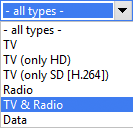
Hide Data Channels
Data channels can be hidden completely from the interface with a single click. This lets you focus on TV and radio channels when building bouquets.
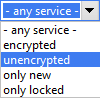
Hide Encrypted Channels
Hiding all encrypted channels also works with a single mouse click. This shows only free-to-air TV and radio channels available for your selection.
Alphabetical Sorting
Click on any column header to sort alphabetically – just like in any file manager or spreadsheet application.
Search & Wildcard Filter
Use the % character as a wildcard placeholder for powerful searches:
- Channel search: enter
%sat%to find all channels containing "sat" (e.g. 3sat, SAT.1) - Provider search: enter
ZDF%to find all channels from providers starting with "ZDF" (e.g. ZDFvision)


You can use the placeholder before and after the search term in both the channel name field (left) and the provider field (right) to achieve a very specific selection. A splash screen explains the placeholder functionality the first time you use the field – you can disable it afterwards.